
DGPikDGPik
  • Wedding Album PSD
  • Photoshop Add-ons
    • Photoshop Plugins/Panel
    • Photoshop Gradients
    • Camera Raw Presets
    • Photoshop Brushes
    • Photoshop Actions
    • Layer Styles
  • Lightroom Presets
  • Free Mockups
  • Backgrounds
  • Photo Overlays
  • LUTs
DGPikDGPik
Search
Follow US
Copyright © 2014-2023 Ruby Theme Ltd. All Rights Reserved.
Photo EffectPhotoshop ActionsPhotoshop Add-ons

50 Pop-out Photo Effect Photoshop Actions

Published March 23, 2023
SHARE

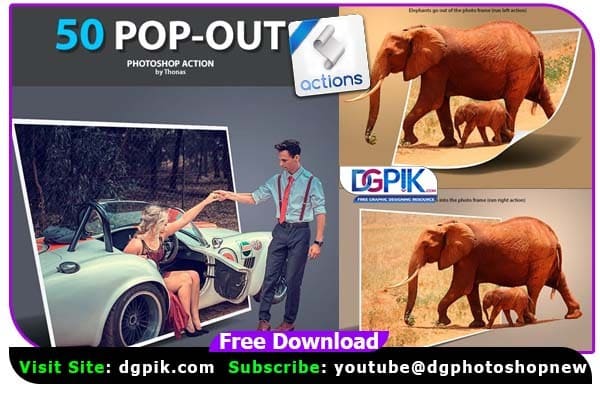
50 Pop-out Photoshop Actions Free Download Create many Pop-out effects with this action (50 styles) 50 Pop-out have tested and working on CS5, CS6, CC 2014, CC 2015, CC 2017, CC 2018+ (Multi-languages). This package includes: 50 Pop_out.atn, Quickly, easy to use, layers are individually editable, save time, save money.This action has been tested and working on Photoshop (Multi languages) CS5, CC6, CC+ This package includes: 50 Pop_out.atn, If you want you can also Download. Photoshop Action
50 Pop-out Photo Effect Photoshop ActionsJPG

Please make sure:

1. If you are experiencing errors, try resetting your Photoshop preferences. To do this,
hold down Alt, Ctrl, and Shift keys (Mac: Command, Option, Shift) while starting up Photoshop.
A dialog box will appear asking if you wish to delete the preferences/settings file.

2. Avoid using small resolution images. For the best results, use Images between
1500px – 4000px high/wide If you want you can also Download. Photoshop Effect

We have shown you the Preview image below, in which you can see how Amazing All its Effects are.

50 Pop-out Photo Effects Photoshop Action

Download the File Easily From the Download Link Given Below

Password is : dgpik.com

Download dgpik

How to Load Photoshop Action

HOW TO INSTALL THE ACTION

1. Open Photoshop, go to the ‘File’ menu and select ‘Open'(Ctrl+O).

2. Browse to the “Action” folder. Select 50 Pop_out.atn and click Open button.

3. The action will now appear in the actions panel.

HOW TO USE THE ACTION

1.Open Photoshop. Open your photo, create a new layer, edit its name into “focus”,
brush over the area you want to “popup”

2. Choose any 50 Pop_out style and run.
Share This Article
Facebook Twitter Copy Link Print

Popular Posts

2025 One Click Pro 4.8 & Album Quicker 6.8
Album Design Software
The Crystalline Collection Photoshop Action Free
The Crystalline Collection Photoshop Action
Photo Effect
THE FLORA COLLECTION Photoshop Action
The Flora Collection Photoshop Action
Photo Effect
THE WANDERLUST COLLECTION Photoshop Action
The Wanderlust Collection Photoshop Action
Photo Effect
THE ROYAL COLLECTION Photoshop Action
The Royal Collection – Photoshop Action Preset
Photo Effect

Categories

  • 12×36 Spread Design
  • 12×36 Templates
  • 16×24 Album Design
  • Adobe Photoshop Tutorial
  • Album Design
  • Album Design Software
  • Album DM Pack
  • Alphabet Letters
  • Anniversary Gifts
  • Artistic Editing
  • Baby Album PSD
  • Baby Photography
  • Backgrounds
  • Banners
  • Birthday Album PSD
  • Birthday Collage
  • Birthday Design
  • Birthday Templates
  • Branding
  • Business Card Psd
  • Camera Raw Assets
  • Camera Raw Presets
  • Camera Raw Tools
  • Cinematic Design
  • Clip Part
  • Close-up Designs
  • Collage Design
  • Creative Design
  • Digital Assets
  • Digital Backgrounds
  • Digital Bundle
  • Digital Downloads
  • Digital Invitations
  • Digital Products
  • Digital Stationery
  • Digital Studio Tools
  • Double Exposure PSD
  • Facebook Covers
  • Floral Album Design
  • Flyers
  • Fonts
  • Format Design
  • Gift Items
  • Graphic Design
  • Graphic Design Assets
  • ID Card Design
  • Illustrator Files
  • Indian Wedding Designs
  • Indian Wedding Vidhi
  • Inner Sheet Templates
  • Instagram Templates
  • Invitation Branding
  • Kids Album Design
  • Kids Modeling PSD
  • Kids Photography
  • Kids Studio Design
  • Large Format Designs
  • Layer Styles
  • Lettering Font Png
  • Lightroom Presets
  • Logo Design
  • LUTs
  • Marathi Wedding PSD
  • Mobile Invitations
  • Mug Design PSD
  • Photo Collage Frame
  • Photo Effect
  • Photo Frame PSD
  • Photo Frames
  • Photo Overlays
  • Photography Assets
  • Photography Automation
  • Photography Marketing
  • Photography Presets
  • Photoshop Actions
  • Photoshop Add-ons
  • Photoshop Brushes
  • Photoshop Gradients
  • Photoshop Plugins
  • Photoshop Plugins/Panel
  • Photoshop Shapes
  • Photoshop Templates
  • Photoshop Tools
  • Photoshop Video Tutorial
  • PNG Files
  • Portfolio Packs
  • Portrait Photography
  • Portrait Tools
  • Pre-Wedding PSD
  • Premium Prouduct
  • Psd Files
  • Psd Mockup
  • Save the Date
  • Social Media Design
  • Software
  • Stock Photo
  • Studio Background
  • Studio Backgrounds
  • Sublimation Printing
  • Text Effects
  • Textures
  • Transitions Pack
  • Uncategorized
  • Vector Files
  • Wedding Album Inner PSD
  • Wedding Album PSD
  • Wedding Cover PSD
  • Wedding Design
  • Wedding Editing
  • Wedding Editing Tools
  • Winter Graphics Bundle

You Might Also Like

Vector Sketch Effect Photoshop Action

Vector Sketch Effect Photoshop Action

Photo Effect
Double Light Photoshop Action

30 Double Light Effect Photoshop Action

Photoshop Actions

Rainstorm Photo Effect Photoshop Action

Photo Effect

MISTY Effect Photoshop Action

Photo Effect
© 2016-2025 All rights reserved DGPik.com
  • Contact us
  • DMCA
  • Privacy Policy
  • Terms and Conditions
Welcome Back!

Sign in to your account

Username or Email Address
Password

Lost your password?



