
Realistic View A5 Flyer Psd Mockup Free Download This item is suitable to showcase your designs professionally in a realistic 3D display. You can replace the design easily and quickly using smart-object features. Available in PSD Mockup Photoshop format with smart-object features to help you replace the current designs with your own within seconds. You Can Also Download Awesome Billboard Psd Mockup
Features :
- Changeable background-color
- 3000×2000 px size
- 300 dpi
- Easy to use with Smart-Objects
Document How to use this Mockup?
1. Find the smart objects layer marked with layer name “Put Your Design Here 1 & 2”. Double-click on its thumbnail and it will open a new tab, paste your design inside it then save and close the tab.
2. Open Folder Background Double-click on the ‘Color Fill 1’ layer thumbnail to change the background color.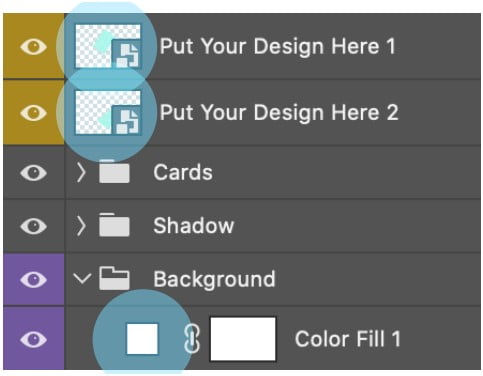
Download the File Easily From the Download Link Given Below
Password is: dgpik.com
DOWNLOAD NOWRealistic View A5 Flyer Psd MockupHow to Use Psd Mockup
Using a PSD mockup is a great way to showcase your designs or products in a professional and realistic manner. Here’s a step-by-step guide on how to use a PSD mockup:
- Download the PSD Mockup: Find a suitable PSD mockup template that fits your needs. There are various websites where you can find free or paid PSD mockups. Make sure to choose a mockup that matches the design or product you want to showcase.
- Open the PSD Mockup: Once you have downloaded the PSD mockup file, open it in Adobe Photoshop or any other graphic design software that supports PSD files.
- Customize the Smart Object: In most PSD mockups, you will find a Smart Object layer. This layer is where you can insert your own design or product. Double-click on the Smart Object layer to open it.
- Insert your Design or Product: The Smart Object layer will open in a new window. This window is where you can place your design or product. If it’s a design, you can copy and paste your artwork into the Smart Object window. If it’s a product, you can drag and drop your product image into the Smart Object window.
- Adjust the Design or Product: Once you have inserted your design or product into the Smart Object window, you can resize, rotate, or position it to fit the mockup template. Make sure to align it properly and adjust any other elements if needed.
- Save and Close the Smart Object: After you have made the necessary adjustments to your design or product, save the Smart Object window and close it. The main PSD mockup file will now update with your customized design or product.
- Fine-tune the Mockup: Back in the main PSD mockup file, you can further customize the mockup if necessary. Some mockups have additional layers that allow you to change colors, backgrounds, shadows, or other elements. Explore the layers panel and adjust these elements as per your requirements.
- Save and Export: Once you are satisfied with your customized mockup, save the final file. You can save it as a PSD file to retain the layers and editability or export it as a high-resolution image in a suitable format such as JPEG or PNG.
- Showcase your Design or Product: You now have a professional-looking mockup ready to showcase your design or product. You can use it for your portfolio, presentations, marketing materials, or any other purposes to give a realistic representation of your work.
Remember to always follow the specific instructions provided with the PSD mockup you’re using, as different mockups may have slight variations in their usage.







