
100 Falling Snow Photo Overlays Free Download Lovely as it would be, we can’t make it snow on demand. However, we have the next best thing. This set includes a variety of snow photo overlays.
They are easy to use, and combined with your own photographs and artwork will produce a captivating winter effect. Transform your photos with only a few steps: simply place the overlay on top of your image, change mode of the overlay layer for ‘screen’ and you’re done.You Can Also Download 50 Falling Snow Photo Overlays
Included in this set:
• 100 snow photo overlays high resolution (5100 x 3450 px – 300 dpi – .JPG)
• 25 overlays are available in .PNG format with transparent background
• Compatible with any software that allows you to work with layers (Photoshop, Photoshop Elements, Paint Shop Pro etc.)
See what you will be able to do
Below you can find Preset Power Examples from each Package.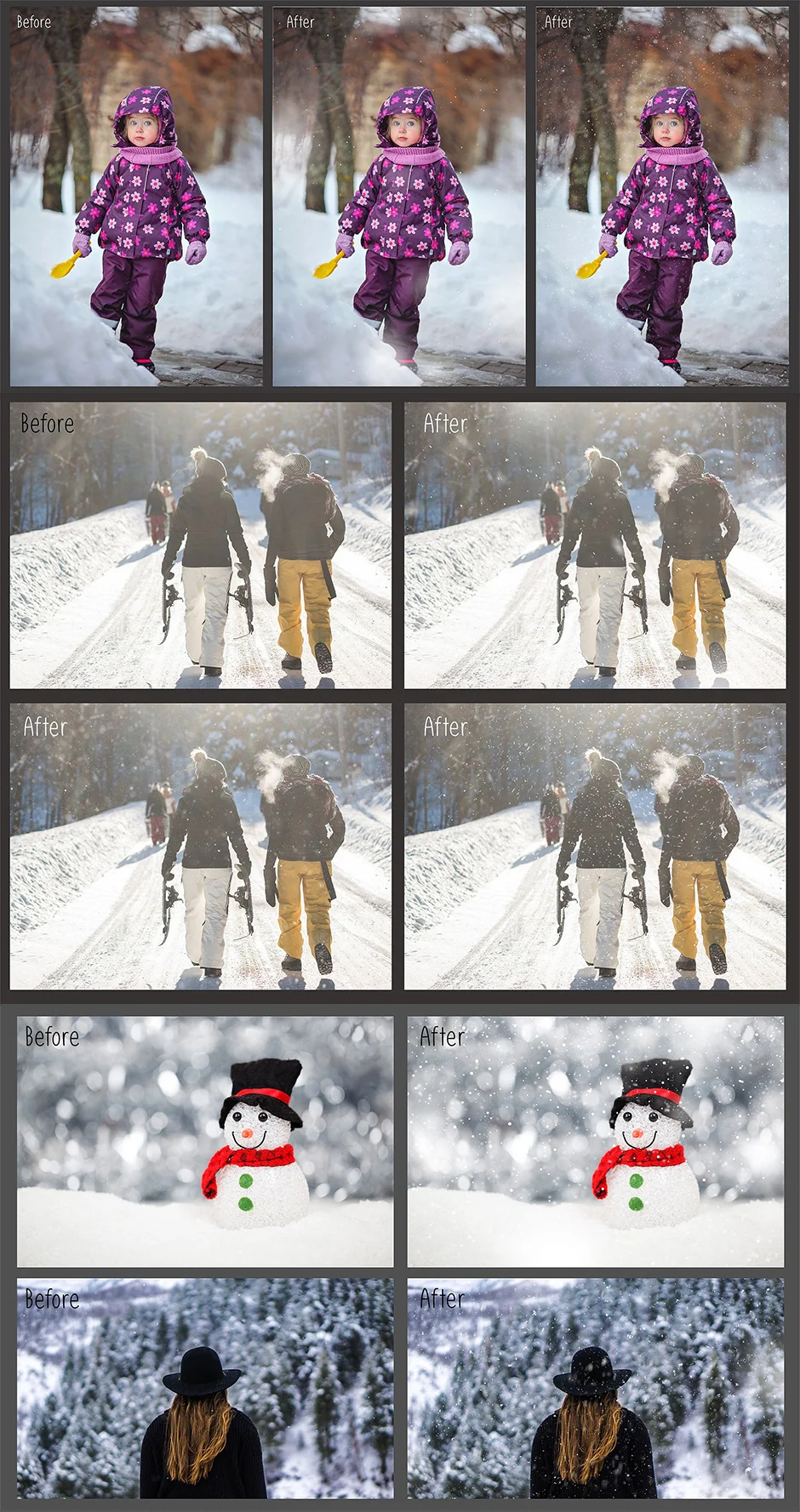
Software compatibility:
Adobe Photoshop CS5 or newer.
.JPG and .PNG files will work with most graphic software.
Download the File Easily From the Download Link Given Below
Password is: dgpik.com
How to Use Overlay
- Determine the software or platform: Identify the software or platform you’ll be using to apply the overlay. Overlays can be used in various contexts, such as image editing software, video editing software, live streaming platforms, or presentation tools. The specific steps may vary depending on the software you choose.
- Create or obtain the overlay: You can either create your own custom overlay or obtain pre-made overlays from various sources. Custom overlays require graphic design skills, while pre-made overlays are readily available online, often in the form of downloadable files.
- Prepare your content: Depending on the context, you need to have the content ready that you want to overlay the graphic onto. This could be an image, video, live stream, or presentation.
- Open the software: Launch the software or platform where you plan to apply the overlay. Ensure that your content is loaded and ready for editing or streaming.
- Import the overlay: If you have a pre-made overlay, you’ll typically need to import the overlay file into your software. Look for options like “Import,” “Add Graphic,” or “Browse” within the software’s interface and locate the overlay file on your computer.
- Position and resize the overlay: Once imported, you can usually click and drag the overlay graphic to position it correctly on your content. You might also have options to resize or rotate the overlay, depending on your software’s capabilities. Use the available tools to adjust the overlay as desired.
- Customize the overlay (optional): Some software provides additional customization options for overlays. You might be able to modify the color, opacity, blending mode, or add effects to the overlay. Explore the software’s settings or properties to make any desired changes.
- Preview and save: Preview your content with the overlay applied to ensure it appears as intended. Make any necessary adjustments to achieve the desired look. Once satisfied, save your work or apply the overlay in real-time if you’re using a live streaming platform.
Remember that specific instructions may vary depending on the software or platform you’re using. It’s recommended to refer to the software’s documentation or search for specific tutorials related to your chosen software for more detailed instructions.







